
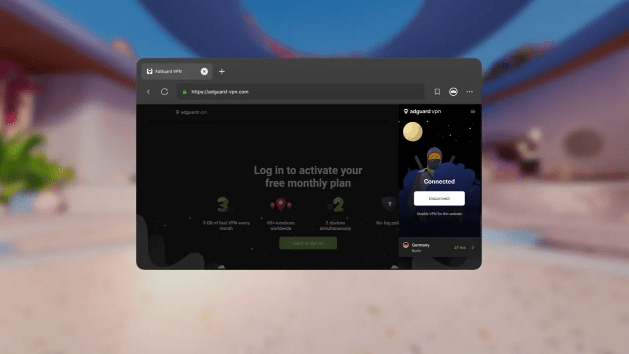
- AdGuard launches two browser extensions for Meta Quest headsets
- These are AdGuard’s VPN and ad blocking browser extensions
- Both expansions work on Quest 2, Quest Pro, Quest 3 and Quest 3S
Browsing the web in virtual reality often feels like the Wild West of privacy, but that’s changing. AdGuard has officially launched two new privacy-focused extensions for the Meta Quest browser: AdGuard ad blocker and the AdGuard VPN.
This release marks an important step for user control in the Metaverse. Although we often think of VR headsets as gaming consoles, they are increasingly used for media consumption and web browsing, activities that are just as susceptible to tracking, pop-ups, and geo-restrictions as on a laptop.
If you are looking for the best VPN to secure your Meta Quest headset, this new integration offers a lightweight alternative to full Android app installations.
A rare addition to the Quest ecosystem
The arrival of these tools is notable because the Meta Quest extension ecosystem is still in its infancy. Meta’s browser, built on Chromium, only began supporting user-installed extensions through a limited beta in early 2024. Currently, the catalog includes fewer than a dozen supported extensions.
AdGuard claims a “first” here, stating that its The ad blocker is one of the first of its kind on the platform, while the VPN extension joins a very exclusive club of security tools integrated directly into the VR browser.
“This isn’t just another platform for us, it’s a step forward in providing secure, distraction-free browsing in immersive environments,” said Vladimir Ozersky, senior product manager at AdGuard.
🎮 AdGuard is launched on Meta Quest: your trusted VPN and ad blocker now in VR. We’re excited to announce that AdGuard is now available on Meta Quest as one of the first ad blocking and VPN extensions for the Meta Quest browser! It’s not just another platform for us – it’s a… pic.twitter.com/UXETCh4kMyMarch 4, 2026
THE AdGuard ad blocker works the same as its desktop counterpart. It’s designed to remove ads, trackers, and pop-ups from websites, which can be particularly intrusive when they float just inches from your eyes in a VR environment. It also provides a layer of protection against malicious phishing websites.
THE AdGuard VPN the extension focuses on anonymity and access. By encrypting browser traffic and hiding your IP address, it allows users to bypass geoblocks, which is handy if you’re trying to stream content from home while traveling with your headset.
“AdGuard VPN goes beyond privacy; it enables true digital freedom,” said Denis Vyazovoy, Product Manager at AdGuard VPN. “Now users can securely and seamlessly access the open Internet in virtual reality, maintaining full control wherever they are. »
Since these are browser extensions rather than full operating system applications, the installation process is handled entirely within the Meta Quest browser.
- Open it Browser application on your headset.
- Click on the Menu icon (three dots) in the upper right corner.
- Select Extension cords.
- Find AdGuard ad blocker Or AdGuard VPN in the list.
- Click Install.
Both extensions are compatible with all headsets running the Meta Horizon operating system, including the Quest 2, Pro Quest, Quest 3and the new Quest 3S.
Users can view full version details on the dedicated AdGuard Ad Blocker and AdGuard VPN pages.


