
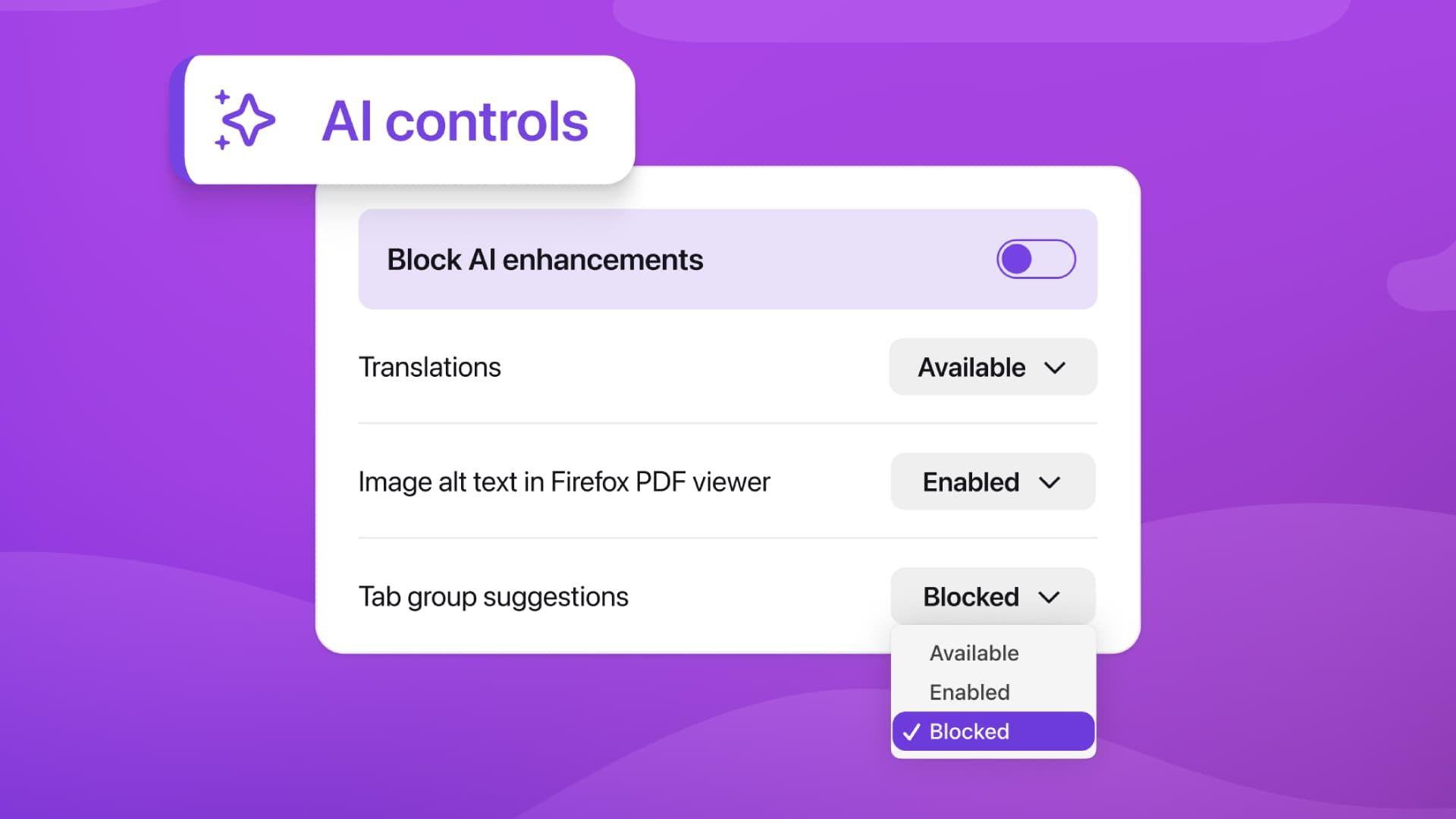
- Mozilla Firefox 148 will soon receive an AI kill switch
- This addition can disable all AI features at once
- You will also be able to disable AI tools individually, if you wish
Firefox is often chosen by people who don’t like the direction Google Chrome and other Chromium-based browsers are going. And as browser makers rush to pack their products with as much artificial intelligence (AI) as possible, Firefox is taking a different approach by introducing an “AI kill switch” that turns off all AI features in the Mozilla app.
In a blog post about the move, Mozilla says users will get this feature with the Firefox 148 update, which is expected to arrive on February 24. Not only will this allow you to manage individual AI features in the browser, but you will also be able to disable them entirely with a single click.
In addition to the all-in-one kill switch, you can choose to enable or disable the following features: translations, alt text in PDF files, AI-powered tab grouping, link previews, and the AI chatbot located in the browser sidebar.
Mozilla caused a backlash in late 2025 when it announced it would bring AI features to the Firefox browser. While these work on your device – meaning your information isn’t sent to any company’s cloud servers – many users were unhappy with the advent of AI features in a browser like Firefox, which has often sought to differentiate itself from competing offerings.
Ban AI from your browser
Look on it
Mozilla’s latest move appears to have garnered a positive reaction from some sections of the internet. Responding to the announcement on Reddit, user jpsreddit85 joked: “Says a lot about the future state of AI when the most requested feature is to turn it off.” User David-J, meanwhile, commented that “Someone is reading the room.”
As a long-time Firefox user, this seems like the right move by Mozilla. AI is controversial at the best of times, but particularly among Firefox users, who pride themselves on their independence and generally seem less attuned to AI than many Internet users.
Adding AI to Firefox has always been a risky move on Mozilla’s part, given the feelings of the user base – adding a way to block it altogether is a smart way to win back support.
That said, this seems like a pretty isolated move in the world of web browsers. Chrome has a near-monopoly on browsers and its creator, Google, a major investor in AI, has added many AI features to the app. Microsoft and Apple, creators of Edge and Safari, are also engaged in AI.
Very few browsers have added an AI kill switch like Firefox’s, although privacy-focused alternatives like Brave and DuckDuckGo can also be customized in this way. All of this means that if you’re tired of the AI in your browser, you have options – you just need to avoid the bigger players.
Follow TechRadar on Google News And add us as your favorite source to get our news, reviews and expert opinions in your feeds. Make sure to click the Follow button!
And of course you can too follow TechRadar on TikTok for news, reviews, unboxings in video form and receive regular updates from us on WhatsApp Also.


